


Autotrader: Shop Cars For Sale
4.512.09K Reviews
App Specs
- Version
- 4.31.0
- Updated On
- License
- Free
- Downloads
- 5,000,000+
- Developer
- Autotrader, Inc.
- Categories
- Auto & Vehicles
- Platform
- Android, iOS
Screenshots
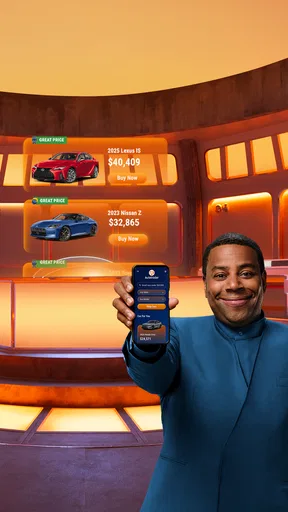
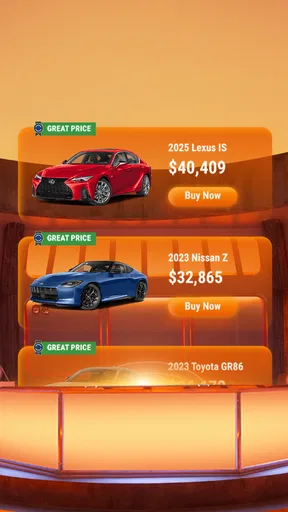
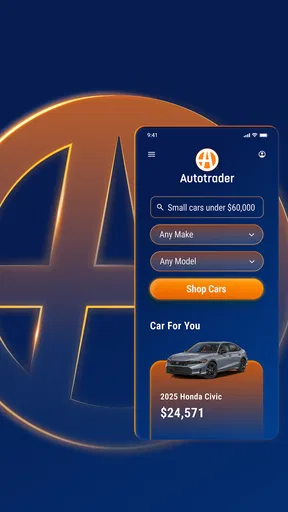
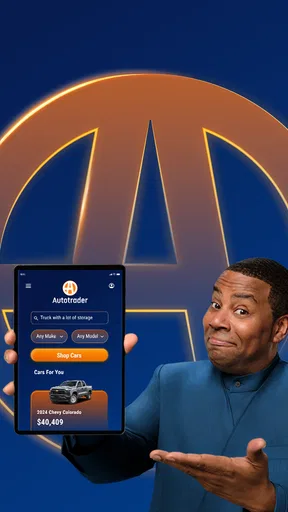

 Analysis by AppCompare
Buying a car can turn into a second job: comparing listings, checking whether a vehicle fits your budget, and deciding which seller is worth contacting. I find Autotrader: Shop Cars For Sale most useful as a place to organize that early search, rather than as a substitute for inspecting a car or making a careful buying decision. It brings the hunt for new and used vehicles onto a phone and gives shoppers a practical starting point, though the quality of any final choice still depends on what you verify beyond the screen.
A useful first pass, not the whole purchase
Autotrader is an automotive-shopping app from Autotrader, Inc. In my experience, its main value is helping you narrow a broad search into a manageable shortlist. You can explore vehicles by make, model, price, and color, then save appealing options so you can revisit them instead of relying on memory or keeping a jumble of browser tabs open.
That kind of organization matters most when you are still deciding what you want. If you are comparing a few types of vehicle, I would use the app to identify candidates and note what makes each one worth a closer look. I would not treat the first promising result as a recommendation: a listing is an invitation to investigate, not proof that the car is right for you.
A realistic use case is a shopper who has a rough budget but has not settled on a model. During a lunch break, they can scan options, save a few plausible cars, and later compare those choices with their actual needs: passenger space, commuting, parking, and expected running costs. That makes the app more helpful than casual browsing because each saved listing can be judged against the same practical criteria.
The app sits in the Auto & Vehicles category, and its focus is straightforward: finding and selling cars. It is free, rated for Everyone, and has an average rating of 4.5 from around 40,000 ratings, with roughly 12,000 written reviews and over 5 million installs. It was released on October 6, 2011, and version 4.25.0 supports devices running Android 9 or later. Those details place it among established choices for car shoppers, but they do not tell you whether a particular listing is a good deal.
Your Virtual Showroom
Picture this: you're lounging on your couch in your PJs, but instead of scrolling through endless TV shows, you're browsing through cars. The Autotrader app is like having a virtual showroom right in your pocket. The interface is super user-friendly, making it easy to filter searches by make, model, price, and even color. You can save your favorites and even get alerts when prices drop. It's like having a personal car shopper without the hefty fee.
Features That Stand Out
Now, let's dive into some of the features that make this app a must-have for anyone in the market for a new ride. Firstly, the app offers detailed vehicle information. We're talking specs, mileage, and even a history report for used cars. It’s pretty much everything you'd want to know before taking the plunge.
Worth Reading Before You Choose

Flipboard Shows What News Apps Must Do Beyond the Feed

Switching to Android Auto Means Rethinking Your Driving Routine

Google Calendar Makes a Crowded Week Easier to Manage

Ludo King Makes the Most of the Minutes Between Plans

Baby Panda World Brings Quick Play to Modern Phones, but Its Game Library Feels Busy

ESPN’s Live Game View Makes Following Close Games Easier
There's also a handy tool for calculating payments, which is perfect for budgeting. You can even apply for financing directly through the app. Talk about convenience! Plus, if you're looking to sell, the app allows you to list your car with ease.
Using listings with a buyer’s eye
The useful next step is to turn the shortlist into a set of questions. If a listing highlights mileage, specifications, or a vehicle history report, I would use those details to decide what to ask the seller and what needs independent checking. A report can help you spot issues worth following up; it is not the same as a hands-on inspection, and it should not settle the decision by itself.
I would also compare like with like. Two cars that share a model name may differ in age, equipment, mileage, and condition, so a headline price alone is a weak basis for choosing. Save the candidates, then compare their details side by side in your own notes. A small habit that helps: write down the reason each car made your shortlist, such as a particular specification or a price that fits your plan. That makes it easier to notice when an attractive listing does not actually meet your needs.
The payment calculator can help translate a purchase idea into a more concrete budget, but I would treat its result as a planning aid rather than a complete cost estimate. A monthly figure is only one part of owning a car; your decision should also account for the costs and terms relevant to your circumstances. If you explore financing through the app, read the terms carefully and compare them with other options before committing.
For sellers, the listing option offers a way to put a car in front of shoppers already browsing vehicles. I would prepare accurate details before creating an advert: clear information makes it easier for interested people to judge whether the car suits them and reduces avoidable back-and-forth. The app can support the listing process, but a seller still needs to respond to questions and handle the actual sale thoughtfully.
Why I’m Hooked
One of the things I love about Autotrader is its community feel. You can read reviews from other users and even see dealer ratings. This transparency builds trust and helps you make informed decisions. I also appreciate the app's sleek design and quick loading times, which make browsing a breeze.
Another cool feature is the "Find a Dealer" option. If you prefer to see the car in person, the app helps you locate the nearest dealership. Plus, the app's integration with maps ensures you won't get lost on the way.
When a different route makes sense
Dealer reviews and ratings can be a useful screening signal, especially when you are deciding whom to contact first. I would read them as context rather than a guarantee: other buyers’ experiences can help shape questions, but they cannot confirm the condition of the vehicle you are considering. Before travelling, I would contact the dealer to check that the specific car is still available and ask anything important that the listing leaves unclear. That simple call can save an unnecessary trip.
Compared with general classified marketplaces, a car-focused search is better suited to narrowing options by vehicle details and keeping car research in one place. A broad marketplace may be more useful if you want to browse many kinds of goods or are focused on private sellers; a dealer’s own site may offer more direct information about its inventory. I see Autotrader as a strong discovery and comparison tool, not as the only place a careful buyer should look.
It is best for people who are actively shopping, still weighing models, or trying to organize several possibilities before visiting sellers. It can also help a seller reach people browsing for cars. It is less suitable if you already know the exact vehicle you want and only need to complete a transaction, or if you expect an app to verify a car’s condition, negotiate on your behalf, or remove the need to inspect paperwork and the vehicle in person.
One practical workflow is to set a realistic price range, filter to vehicles you would genuinely consider, and save a small shortlist instead of collecting every interesting result. Revisit it after a day, remove options that no longer fit, and contact only the sellers whose listings answer your key questions. If prices change, alerts can prompt a fresh look, but a lower asking price is a reason to investigate—not automatic proof of better value.
Before setting off to view a car, I would confirm the location, availability, and details that matter most to me. At the visit, compare the car with its listing and take time to assess it rather than letting an attractive photo or a convenient payment estimate rush the decision. This is where the app’s role ends and careful real-world checking begins.
Final Thoughts
All in all, Autotrader: Shop Cars For Sale is a game-changer for anyone looking to buy or sell a car. It simplifies the process, offers a wealth of information, and makes car shopping a whole lot more enjoyable. If you're in the market for a new set of wheels, I highly recommend giving this app a try. It's like having a dealership in your hand, minus the pushy salespeople!
My recommendation is strongest for shoppers who want a convenient way to explore, compare, and keep track of vehicles before making calls or arranging a visit. I would pair it with direct questions to sellers and an in-person check, rather than relying on a listing, rating, or estimated payment alone. With that sensible boundary, it is a useful companion for a search that can otherwise become scattered and tiring.
Pros
- User-friendly interface for easy navigation.
- Comprehensive filters for tailored searches.
- Detailed vehicle descriptions and history.
- Secure communication with sellers via app.
- Wide range of listings across various categories.
Cons
- Limited private seller options available.
- Occasional app crashes disrupt browsing.
- Some listings lack updated information.
- In-app ads can be slightly intrusive.
- Requires internet connection for full functionality.
FAQs for Autotrader: Shop Cars For Sale
What features does the Autotrader app offer for car buyers?
The Autotrader app provides a comprehensive platform for car buyers, offering features such as detailed vehicle listings, advanced search filters, and the ability to compare cars side by side. Users can also access vehicle history reports, read expert and user reviews, and contact sellers directly through the app, ensuring a seamless buying experience.
Is the Autotrader app free to use, and are there any in-app purchases?
Yes, the Autotrader app is free to download and use. While the core functionalities like browsing listings and contacting sellers are completely free, there may be optional in-app purchases for premium features such as enhanced vehicle history reports or advanced search capabilities. However, these are not mandatory for using the app.
How reliable is the information provided in the vehicle listings on Autotrader?
Autotrader strives to ensure the accuracy and reliability of the vehicle listings by partnering with trusted dealerships and sellers. Each listing includes detailed descriptions, photos, and often vehicle history reports. However, it's recommended that users verify details directly with the seller and potentially arrange a professional inspection before finalizing any purchase.
Can I sell my car using the Autotrader app, and how does the process work?
Yes, you can sell your car through the Autotrader app. The process involves creating a listing by entering your vehicle's details, uploading photos, and setting a price. The app guides you through each step, helping you reach millions of potential buyers. You can manage and update your listing directly from the app, making it a convenient tool for sellers.
Does the Autotrader app offer any tools for financing or calculating car payments?
The Autotrader app includes several tools to assist with financing, such as a car loan calculator to estimate monthly payments based on the loan amount, interest rate, and term length. Additionally, the app can connect you with financing options from various lenders, helping you understand your budget and make informed purchasing decisions.


